What Is ECC Memory? Error-Correcting Code RAM Explained
ECC memory detects and corrects single-bit errors in RAM automatically, using extra parity bits — critical for servers where silent corruption is costly.
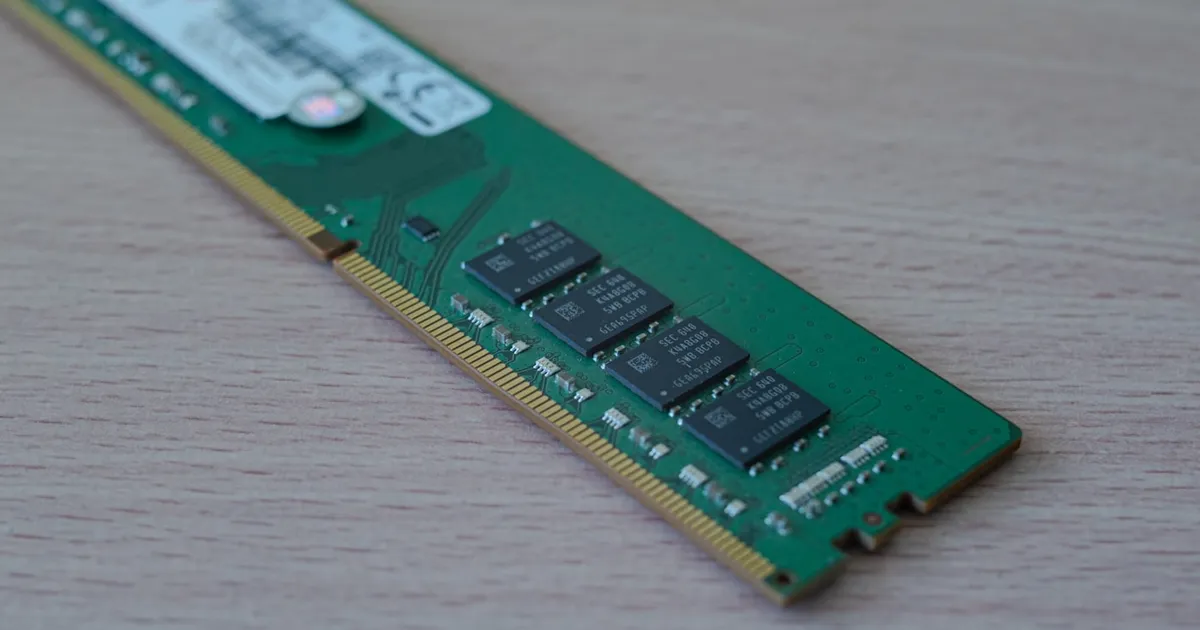
ECC memory (error-correcting code memory) is RAM that stores extra parity bits alongside each word of data, allowing it to detect and automatically correct certain kinds of memory errors without the operating system or application ever noticing. Standard, non-ECC memory has no such mechanism: if a bit flips, whatever value was corrupted simply gets used as-is, silently, until it eventually causes a crash, a corrupted file, or — worse — a wrong answer that nobody catches.
Why bits flip in the first place
RAM stores each bit as a tiny electrical charge, and that charge can occasionally be disturbed by sources like cosmic rays, background radiation from trace amounts of radioactive material in chip packaging, or electrical noise — flipping a stored 0 to a 1 or vice versa. These are called soft errors, because the memory cell itself isn’t damaged; the stored value is just momentarily wrong. Soft errors are individually rare, but a server with enormous amounts of installed RAM, running continuously for years, accumulates enough cumulative exposure that at scale they become a real, non-negligible reliability concern rather than a theoretical one.
How ECC catches and fixes them
ECC memory uses an error-correcting code — commonly a Hamming code variant — that stores a handful of extra parity bits for every 64 bits of actual data. Those parity bits are calculated from the data when it’s written, and recalculated and compared every time the data is read back:
- If the parity check matches, the data is returned as-is — no error occurred.
- If a single-bit error is detected, the extra parity bits contain enough redundant information to identify exactly which bit flipped and correct it on the fly, transparently, before the corrected value is handed back to the CPU.
- If a multi-bit error is detected (rarer, but possible), most ECC implementations can at least detect that corruption occurred, even if they can’t always correct it — and the system can then respond by logging the event or halting, rather than silently continuing on bad data.
This “detect and correct single-bit, detect multi-bit” capability is usually summarized as SEC-DED (single error correction, double error detection), the most common ECC configuration in mainstream server and workstation memory.
The cost: extra chips, a small performance tax
ECC’s redundancy isn’t free. A typical ECC module dedicates roughly one extra bit of storage for every eight bits of real data, which is why ECC memory modules and the memory controllers that support them cost more than non-ECC equivalents, and why ECC support has historically been reserved for server- and workstation-class hardware rather than mainstream consumer parts. There’s also a small, usually negligible, latency cost from the controller performing the parity calculation and check on every access — a tradeoff most server and data-integrity-sensitive workloads accept willingly in exchange for the reliability guarantee.
Where it matters most
ECC matters most in exactly the settings where a silent, uncorrected bit flip is expensive: servers running continuously for years, systems with very large amounts of installed RAM (more memory means more statistical exposure to soft errors), and any workload where a wrong answer is worse than a slow one — financial calculations, scientific computing, database storage engines that assume the bytes they read back are the bytes they wrote.
It matters comparatively less for a typical consumer laptop or desktop doing everyday tasks, where an occasional, extremely rare bit flip is unlikely to be noticed and the cost of ECC hardware isn’t easily justified against the low probability of impact. This is the same reasoning that shows up in other reliability-vs-cost tradeoffs in infrastructure — see our explainer on what a semiconductor process node actually trades off, or how chaos engineering deliberately tests for the failures ECC-class hardware is trying to prevent in the first place.
ECC vs non-ECC memory
| Non-ECC memory | ECC memory | |
|---|---|---|
| Detects single-bit errors | No | Yes |
| Corrects single-bit errors | No | Yes, automatically |
| Detects multi-bit errors | No | Usually, though not always correctable |
| Extra storage overhead | None | ~12.5% (1 bit per 8) |
| Typical use | Consumer desktops, laptops | Servers, workstations, storage arrays |
| Cost | Lower | Higher — module and motherboard/controller support required |
ECC and the rest of the memory hierarchy
ECC operates at the level of main memory (DRAM), which sits below the CPU’s cache hierarchy in the memory system — a topic distinct from, but related to, the choice between memory technologies covered in our DDR vs GDDR explainer and the general SRAM vs DRAM tradeoffs that shape how each level of that hierarchy is built. ECC isn’t about which memory technology is used — it’s an orthogonal reliability layer that can, in principle, be added to different memory types, though it’s most commonly discussed in the context of server-grade DDR DRAM.
Server-grade storage systems apply the same underlying idea beyond RAM too: database write-ahead logging and checksummed storage formats exist for a related reason — detecting corruption before it silently propagates into results a system, or a person, ends up trusting.
The takeaway
ECC memory adds extra parity bits to every stored word of data, letting the memory controller detect and automatically correct the single-bit errors that occasionally occur from cosmic rays, background radiation, and electrical noise — without the operating system or any application ever being aware an error happened. The tradeoff is extra chips, a modest storage overhead, and platform support requirements, which is why it remains concentrated in servers and workstations where large memory footprints, long uptimes, and the cost of a silently wrong answer make the extra reliability worth paying for.
Keep reading
 Chisato · · 4 min read
 Thermal Interface Materials Explained
Thermal interface material fills microscopic gaps between a chip and its heatsink so heat can actually transfer to the cooler.
Chisato · · 4 min read Clock Speed vs. IPC: What Actually Makes a CPU Fast
Clock speed measures cycles per second; IPC measures work done per cycle. Real CPU performance is the product of both, not either one alone.
 Chisato · · 4 min read
 UMA vs NUMA: Memory Architecture Explained
UMA gives every CPU core equal-latency memory access; NUMA gives each core faster access to its local memory bank. How the two architectures differ.