DDR vs GDDR Memory: What's the Difference?
DDR and GDDR are both DRAM, but optimized for opposite goals: DDR minimizes latency for CPUs, GDDR maximizes bandwidth for GPUs. Here's how they diverge.
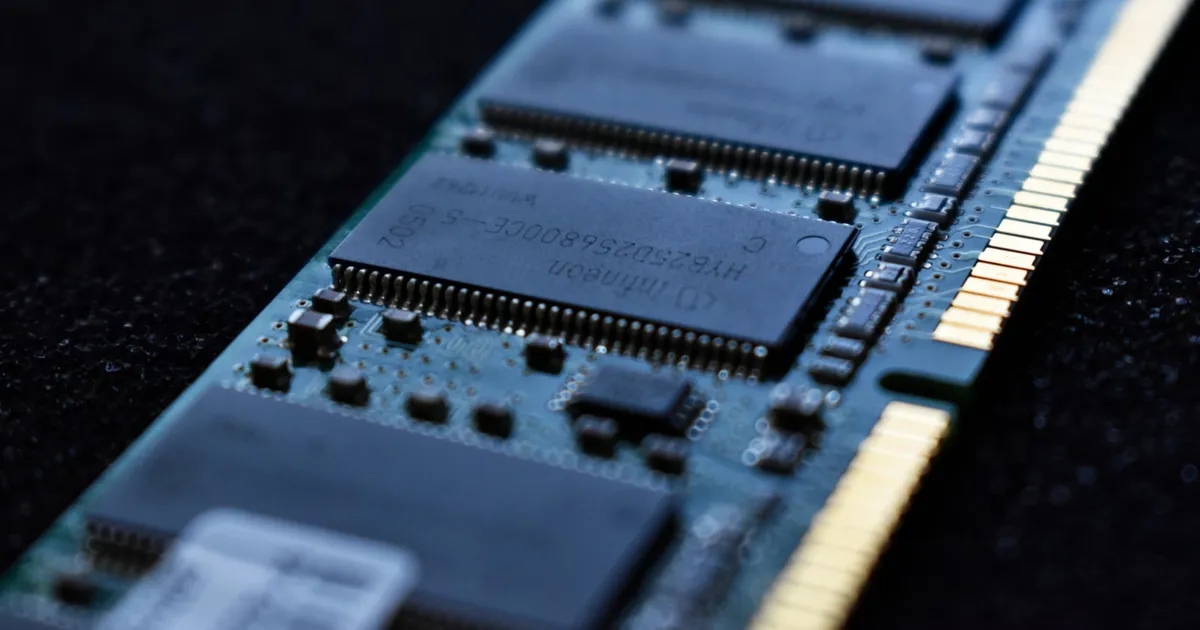
DDR and GDDR are both types of DRAM, but they’re engineered for opposite priorities. DDR (Double Data Rate) memory is built to minimize latency for a CPU juggling many small, unpredictable requests. GDDR (Graphics DDR) is built to maximize raw bandwidth for a GPU streaming huge, predictable blocks of data — textures, framebuffers, model weights. Same underlying storage technology, very different tradeoffs.
Same foundation, different jobs
Both are forms of DRAM — dynamic RAM that stores each bit as a charge in a capacitor and needs constant refreshing to avoid losing data. The distinction is in how the memory is organized and clocked around that shared foundation, driven by what each processor actually needs from it.
A CPU executes a stream of varied instructions — branch here, load a small value there, compare, jump. Its memory access pattern is unpredictable and latency-sensitive: the CPU is often stalled waiting for one specific value before it can proceed. A GPU, by contrast, runs the same operation across thousands of data-parallel threads, streaming large contiguous blocks (a texture, a batch of matrix rows) where the exact latency of any single access matters far less than the aggregate rate of data flowing through.
How DDR is built for latency
DDR memory sits on modules (DIMMs) connected to the CPU over a relatively narrow bus — 64 bits per channel, with modern systems typically running two to eight channels. It’s designed to respond quickly to a single request and to support flexible access patterns: random reads, small writes, everything a general-purpose processor throws at it. Each new generation (DDR4, DDR5) roughly doubles transfer rate over its predecessor while working to keep latency low, since CPU performance is often bound more by how fast a value comes back than by aggregate throughput.
DDR is also field-upgradable — sold as standardized DIMMs that plug into a socket, which is why you can buy extra RAM for a desktop or laptop independently of the CPU.
How GDDR is built for bandwidth
GDDR memory is soldered directly onto the graphics card, right next to the GPU die, with a much wider aggregate bus — high-end graphics cards commonly run 256-bit to 384-bit total bus widths, versus DDR’s 64 bits per channel. GDDR also clocks its data-transfer rate far higher than DDR, at the cost of higher power draw and heat per bit moved, and it isn’t designed for the kind of latency-sensitive, small random access a CPU needs — it’s optimized to move enormous contiguous blocks as fast as possible.
Because GDDR is soldered rather than socketed, it isn’t user-upgradable — the amount of video memory on a graphics card is fixed at manufacture.
Side-by-side comparison
| DDR | GDDR | |
|---|---|---|
| Optimized for | Low latency, varied access | High bandwidth, sequential access |
| Typical host | CPU, system memory | GPU, graphics/AI accelerator cards |
| Mounting | Socketed DIMMs, upgradable | Soldered to the board |
| Bus width | 64 bits per channel | Much wider aggregate bus |
| Power per bit moved | Lower | Higher |
| Access pattern | Random, small, latency-sensitive | Large, contiguous, throughput-sensitive |
Where HBM fits in
Neither DDR nor GDDR is the end of the story for the most bandwidth-hungry workloads. High-Bandwidth Memory (HBM) takes the GDDR philosophy further by stacking DRAM dies vertically and mounting them right on the same package as the processor, trading upgradability and cost for even more bandwidth per watt than GDDR can achieve. This is why AI accelerators processing massive LLM weight matrices increasingly use HBM rather than GDDR — the memory wall for AI training and inference is even more severe than for graphics rendering, so it’s worth paying HBM’s higher cost and lower per-die capacity to get the bandwidth. That same AI demand is what pulled the whole memory market out of its usual boom-bust rhythm — the market side of that story is the AI memory supercycle.
The rough hierarchy for a given generation, from lowest to highest bandwidth (and cost, and power density): DDR, then GDDR, then HBM. Each step trades flexibility and cost-per-gigabyte for raw data rate.
Why this split exists instead of one universal memory type
You could, in principle, put GDDR on a CPU or DDR on a GPU. It’s rarely worth doing. A CPU running GDDR would pay for bandwidth it mostly can’t use, while suffering the higher latency GDDR’s design accepts in exchange for that bandwidth. A GPU running DDR would be starved — its thousands of parallel compute units would sit idle waiting for data far more often, since DDR’s narrower bus can’t keep up with GPU-scale throughput demands. The split exists because CPU and GPU workloads genuinely want opposite things from memory, and no single design optimizes for both simultaneously.
The takeaway
DDR and GDDR are the same underlying DRAM technology, split into two engineering directions by what their host processor actually needs: DDR chases low latency and flexible access for a CPU’s unpredictable workload, GDDR chases raw bandwidth for a GPU’s massively parallel, predictable one. HBM extends the bandwidth-first philosophy even further for AI accelerators willing to pay more per gigabyte. None of the three is strictly “better” — each is the right answer for a different access pattern.
Keep reading
 Chisato · · 4 min read
 Thermal Interface Materials Explained
Thermal interface material fills microscopic gaps between a chip and its heatsink so heat can actually transfer to the cooler.
Chisato · · 4 min read Clock Speed vs. IPC: What Actually Makes a CPU Fast
Clock speed measures cycles per second; IPC measures work done per cycle. Real CPU performance is the product of both, not either one alone.
 Chisato · · 4 min read
 UMA vs NUMA: Memory Architecture Explained
UMA gives every CPU core equal-latency memory access; NUMA gives each core faster access to its local memory bank. How the two architectures differ.