SRAM vs DRAM: Why Chips Use Both
SRAM is fast, expensive, six-transistor memory used for CPU caches; DRAM is slower, cheaper, one-transistor memory used for main system memory.
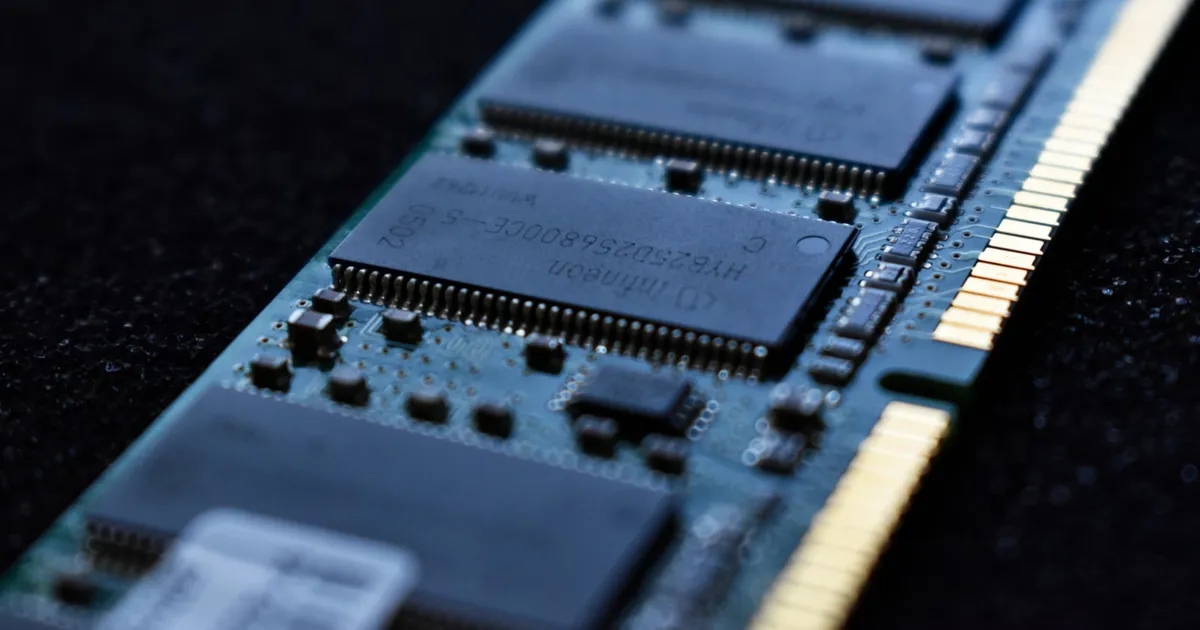
SRAM (static RAM) and DRAM (dynamic RAM) are the two dominant types of volatile memory in a computer, and the difference between them explains why every chip uses both instead of just the faster or just the cheaper one. SRAM is built from six transistors per bit, holds its state as long as power is applied, and is fast enough to keep up with a CPU core. DRAM stores each bit as a charge on a single capacitor, needs constant refreshing to avoid losing that charge, and is far denser and cheaper per gigabyte — but noticeably slower.
How each one stores a bit
An SRAM cell uses six transistors arranged as a pair of cross-coupled inverters that latch into one of two stable states — a 0 or a 1 — and stay there as long as the cell has power. Reading or writing is just flipping or sensing that latch, which is fast and doesn’t disturb the stored value. The tradeoff is size: six transistors per bit takes up far more silicon area than the alternative, which limits how much SRAM a chip can afford to include.
A DRAM cell uses a single transistor and a single capacitor. The capacitor’s charge represents the bit, which makes the cell tiny and cheap to manufacture in bulk — but capacitors leak charge over time, so DRAM has to be read and rewritten (refreshed) thousands of times per second just to retain its contents, even when nothing is actively using it. That refresh overhead, plus the extra step of sensing a tiny capacitor charge instead of a latched transistor state, is why DRAM access is measured in tens of nanoseconds where SRAM access is measured in a few nanoseconds or less.
Why this maps to the memory hierarchy
Every layer of a computer’s memory hierarchy trades capacity for speed, and SRAM versus DRAM is the physical basis for the split between CPU cache and main memory. L1, L2, and often L3 cache are built from SRAM — small, fast, and physically close to the CPU cores, because six-transistor density limits how many megabytes are practical to include on-die. Main system memory is DRAM, sold in gigabytes rather than megabytes, because its cost and density scale to the sizes an operating system and applications actually need, at the cost of being an order of magnitude slower to access.
| SRAM | DRAM | |
|---|---|---|
| Cell structure | 6 transistors | 1 transistor + 1 capacitor |
| Needs refreshing | No | Yes, constantly |
| Speed | Very fast (single-digit ns) | Slower (tens of ns) |
| Density / cost per GB | Low density, expensive | High density, cheap |
| Typical use | CPU cache (L1/L2/L3) | Main system memory |
| Power when idle | Low (no refresh needed) | Higher (refresh cycles continue) |
Where this shows up beyond the CPU
The same tradeoff drives memory choices in GPUs and AI accelerators. A GPU needs to feed thousands of parallel cores with data, so it pairs on-chip SRAM caches with high-bandwidth DRAM-based memory like HBM, which stacks DRAM dies vertically to maximize bandwidth per unit of area rather than optimizing for lowest latency. Chips built for AI inference and training lean on the same principle at a different scale: register files and on-chip SRAM buffers hold data being actively computed on, while HBM or other DRAM technology supplies the much larger volume of weights and activations that don’t fit on-chip. This is also part of why chiplet designs sometimes dedicate an entire chiplet to SRAM — stacking extra cache close to compute dies without needing to shrink the whole chip to the same process node.
Purpose-built chips like FPGAs and NPUs make the same tradeoff explicitly in their memory architecture, sizing on-chip SRAM buffers to the specific workloads they’re designed for rather than using a general-purpose cache hierarchy.
Why not just use one or the other
An all-SRAM computer would be extremely fast but prohibitively expensive and physically large — six transistors per bit means a few gigabytes of SRAM would consume far more silicon than a modern chip’s entire die budget. An all-DRAM computer would be cheap and dense but slow, because every memory access — even for the same few bytes accessed repeatedly in a tight loop — would pay DRAM’s full latency instead of hitting a fast cache. The two-tier (or multi-tier, with L1/L2/L3 SRAM caches backed by DRAM main memory) approach exists because most programs exhibit locality: they tend to access the same small set of data repeatedly over short windows, so a small amount of fast SRAM near the compute cores captures most of the benefit, while bulk DRAM handles everything that doesn’t fit.
This locality principle is also why cache design keeps mattering even as per-transistor costs shift with each new process node under Moore’s law — cheaper transistors don’t eliminate the latency gap between an on-die SRAM cache and off-die DRAM, they just shift how much of each a given chip budget can afford.
The takeaway
SRAM trades transistor count and cost for speed and no refresh overhead, making it the natural fit for the small, fast caches sitting right next to CPU and GPU cores. DRAM trades speed for density and cost, making it the natural fit for the gigabytes of main memory a system needs but can’t afford to build entirely out of six-transistor cells. Nearly every computing device uses both, layered by locality — fast SRAM for what’s being used right now, cheap DRAM for everything else.
Keep reading
 Chisato · · 4 min read
 Thermal Interface Materials Explained
Thermal interface material fills microscopic gaps between a chip and its heatsink so heat can actually transfer to the cooler.
Chisato · · 4 min read Clock Speed vs. IPC: What Actually Makes a CPU Fast
Clock speed measures cycles per second; IPC measures work done per cycle. Real CPU performance is the product of both, not either one alone.
 Chisato · · 4 min read
 UMA vs NUMA: Memory Architecture Explained
UMA gives every CPU core equal-latency memory access; NUMA gives each core faster access to its local memory bank. How the two architectures differ.